A tiny storyteller: how a computer learns to write, one letter at a time
We gave a small AI a book of fairy tales and a guessing game. Watch, in pictures and animations, how its guesses sharpen and its stories grow.
 @seawan · · Updated 2026-11-04 · 19 min read · code & data · ✓ Delta-reproducible
#The question
Try this. What letter comes next?
Once upon a ti_
You probably said m, to make "time". You knew because you have heard lots of stories.
AI chatbots like Claude and ChatGPT do something surprisingly similar. Underneath, they play one simple game, over and over: guess what comes next. A scientist called Claude Shannon played this game with people in 1951. He showed them the start of a sentence and asked them to guess the next letter [1].
So here is our question: if a computer only ever plays this guessing game with one book, can it learn to write like that book?
To find out, we built a tiny storyteller. We gave it a book of fairy tales and let it practise the game. Then we watched how its guesses and its writing changed.
#Specs: system & compute
| Deployment | domestic |
|---|---|
| Image | PyTorch CUDA13 (GPU) |
| CPU | 2 |
| Memory | 8Gi |
| GPU | 1 × GPU (8000 MiB each) |
| Run time | 4 min 56 s |
| Run ID | e4141a8b85334853a189049fbd217b7b |
| Date | 2026-11-02 |
| Packages | 36 packagescontourpy==1.3.2, cycler==0.12.1, filelock==3.29.0, fonttools==4.65.0, fsspec==2026.4.0, Jinja2==3.1.6, kiwisolver==1.5.1, MarkupSafe==3.0.3, matplotlib==3.10.9, mpmath==1.3.0, networkx==3.4.2, numpy==2.2.6, nvidia-cublas-cu12==12.1.3.1, nvidia-cuda-cupti-cu12==12.1.105, nvidia-cuda-nvrtc-cu12==12.1.105, nvidia-cuda-runtime-cu12==12.1.105, nvidia-cudnn-cu12==9.1.0.70, nvidia-cufft-cu12==11.0.2.54, nvidia-curand-cu12==10.3.2.106, nvidia-cusolver-cu12==11.4.5.107, nvidia-cusparse-cu12==12.1.0.106, nvidia-nccl-cu12==2.21.5, nvidia-nvjitlink-cu12==12.9.86, nvidia-nvtx-cu12==12.1.105, packaging==26.3, pillow==12.2.0, pyparsing==3.3.3, python-dateutil==3.0.0, six==1.17.0, sympy==1.13.1, torch==2.5.1+cu121, torchaudio==2.5.1+cu121, torchvision==0.20.1+cu121, triton==3.1.0, typing_extensions==4.15.0, tzdata==2026.6 |
Recorded from the actual Delta run, not typed by hand.
#What we did
This section explains the whole setting, step by step. Each step has a picture.
#Step 1: the book
Our storyteller learned from one book: Grimms' Fairy Tales. It has stories like Hansel and Gretel and Rumpelstiltskin. Its first English translation is about 200 years old, so anyone may copy it.
To the computer, the book is not pages and chapters. It is one very long line of letters.
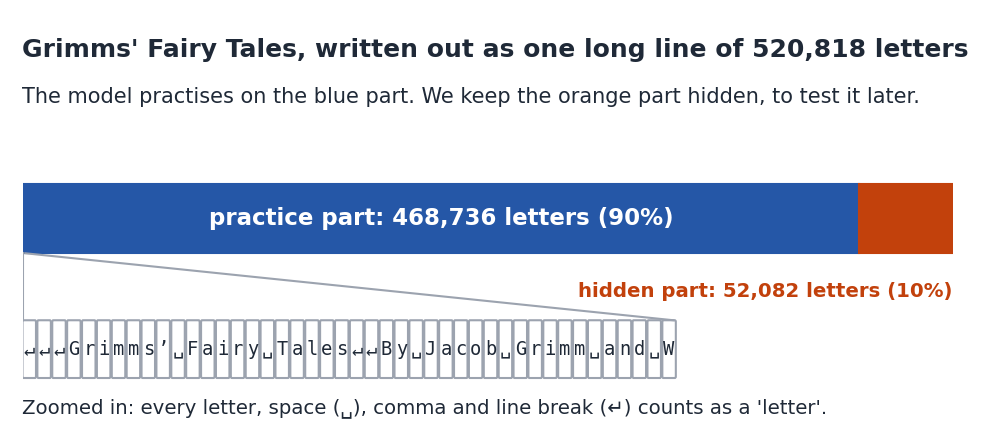
We cut the line into two parts:
- The practice part (the first 90%). The model learns from this part.
- The hidden part (the last 10%). The model never learns from this part. We use it like a surprise test.
#Step 2: what counts as a "letter"
For our storyteller, a "letter" means any single symbol in the book. That includes capital letters, small letters, spaces, commas, quotation marks and even line breaks. The book uses 81 different symbols in all.
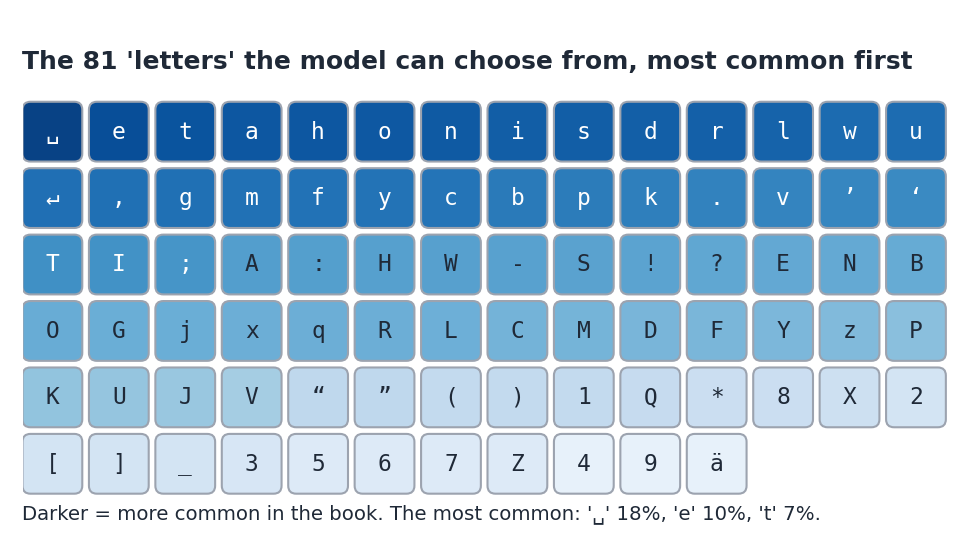
Every time the model makes a guess, it must choose one of these 81 tiles.
#Step 3: the guessing game
The game is always the same:
- The model reads some letters of the book.
- It guesses the next letter.
- We check its guess against the real next letter in the book. That real letter is the right answer.
The model does not give just one guess. It gives odds for every possible letter. Odds tell you how likely it thinks each choice is. For example, after "Once upon a ti", a good guesser might say: "m: 95%, n: 2%, anything else: 3%". The odds for all the letters always add up to 100%.
#Step 4: inside the model
A model that guesses the next bit of text is called a language model. Ours is a kind called a transformer, the same kind used in today's chatbots [2].
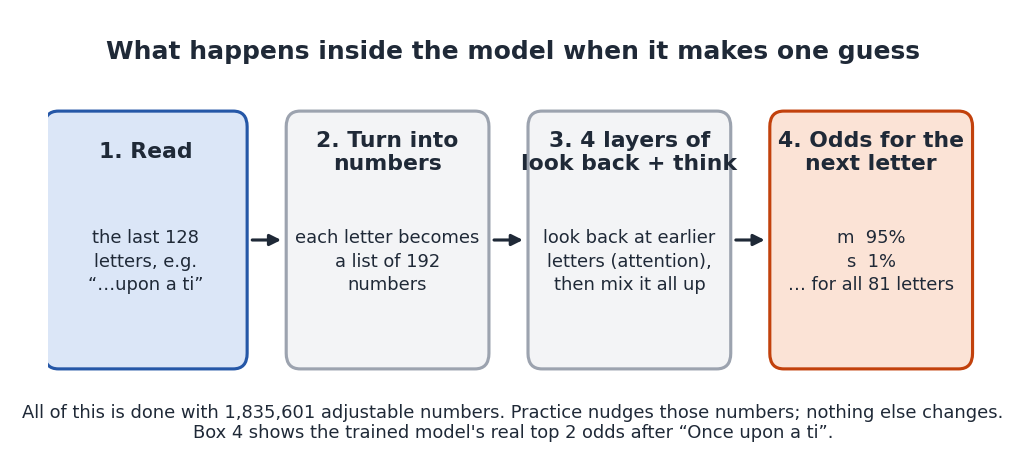
Here is what the boxes mean:
- It can look back 128 letters. That is about two lines of a book. Anything further back, it cannot see.
- Letters become numbers. Computers only work with numbers, so each letter is turned into a list of numbers.
- Look back and think. In each layer, the model looks back at the earlier letters and decides which ones matter most for this guess. This looking back is called attention. Then it mixes everything together. It does this 4 times.
- Odds come out. At the end, it gives odds for every one of the 81 letters.
All of this is done with 1835601 numbers inside the model. Think of them as 1835601 tiny knobs. When the model is brand new, the knobs are set at random, so its guesses are rubbish.
#Step 5: practice
Practice (scientists call it training) means turning those knobs a tiny bit, again and again, so that the right answers get higher odds. The computer is not "trying hard" or thinking like you. It is just adjusting numbers.
Here is one round of practice, which we call a practice step:
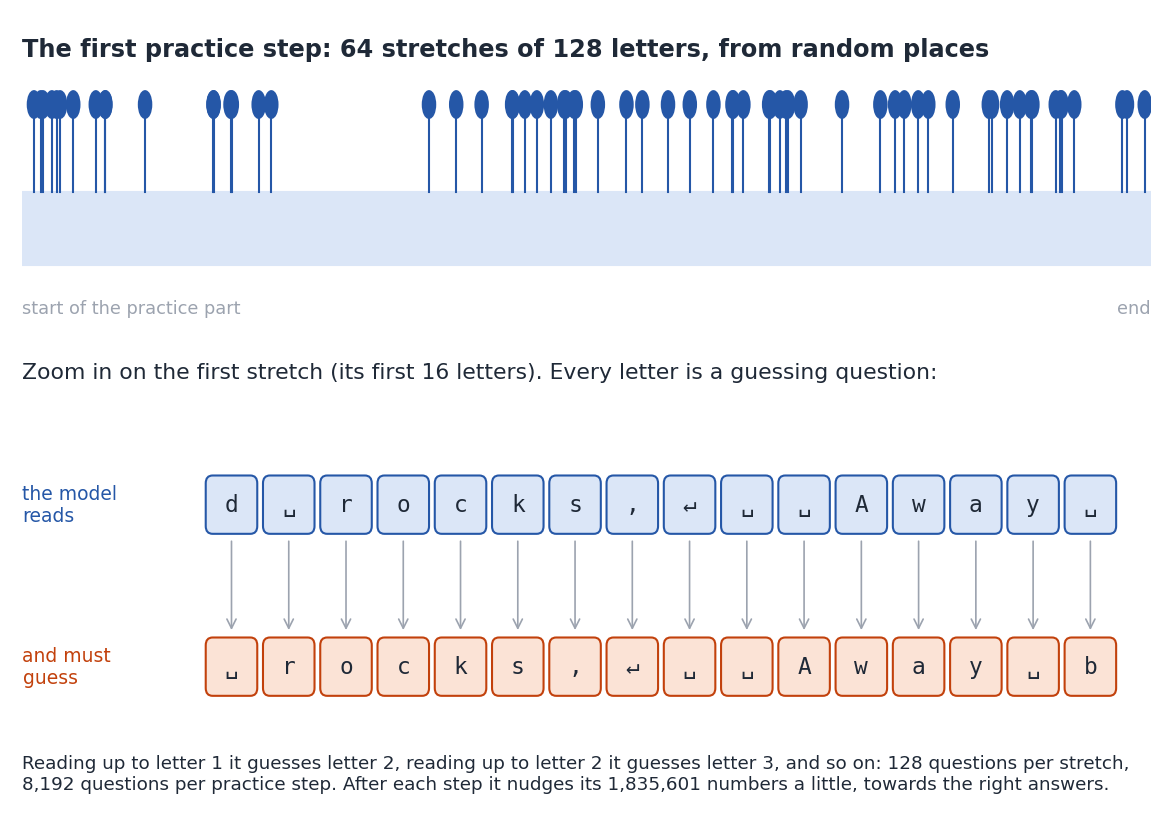
In each practice step:
- The computer picks 64 random places in the practice part of the book.
- From each place, it takes a stretch of 128 letters.
- Every letter in every stretch is a guessing question. That makes 64 × 128 = 8,192 questions in one step!
- It checks all its guesses against the real letters.
- It turns the knobs a tiny bit, so the real letters would have got higher odds.
We did 2000 practice steps. That is more than 16 million guessing questions.
#Step 6: checking on the hidden part
At five moments during practice we stopped and checked the model. These moments are called checkpoints: after 0 steps (brand new), 100, 300, 1,000 and 2000 steps.
At each checkpoint we did three things, always on the hidden part of the book:
- We counted how often its first guess (the letter with the highest odds) was right.
- We measured how many letters it was torn between (explained in the next step).
- We asked it to write a story starting with "Once upon a time".
#Step 7: how we score it
The easiest score is the first guess. Out of 100 guesses, how many times did the letter it thought most likely turn out to be the real letter?
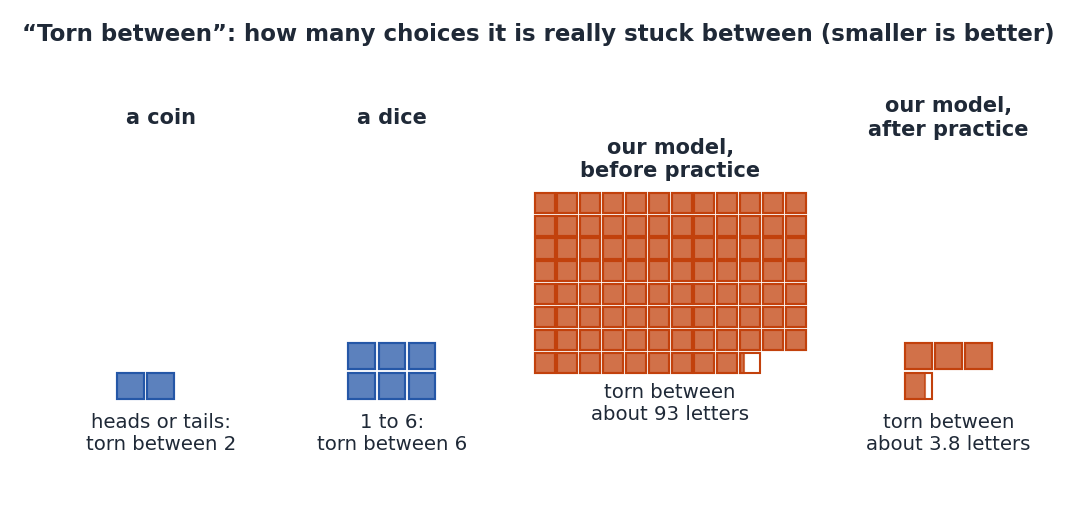
The second score needs a little explaining. It is called "torn between". (Scientists call it perplexity.)
#Where it ran
The model practised on a GPU, a computer chip that can do many sums at once, in a Delta cloud sandbox: a computer far away that we borrowed for a few minutes.
    for _ in range(SAMPLE_LENGTH):
        scores = model(ids[:, -CONTEXT:])[0, -1] / TEMPERATURE
        odds = F.softmax(scores, dim=-1).cpu()
        next_id = torch.multinomial(odds, 1, generator=generator).to(DEVICE)
        ids = torch.cat([ids, next_id.view(1, 1)], dim=1)
#Results
This part is for playing with. Look out for the boxes marked Interactive. Each one asks you to guess first, then lets you explore. They all use the model's real recorded results.
#1. Watch one guess get sharper
Let's start with a single question: what comes after "Once upon a ti"? Make your guess in the box below, then slide through the practice steps and try both beginnings.
Here are the same odds as an animation. The orange bar is the right answer, m.
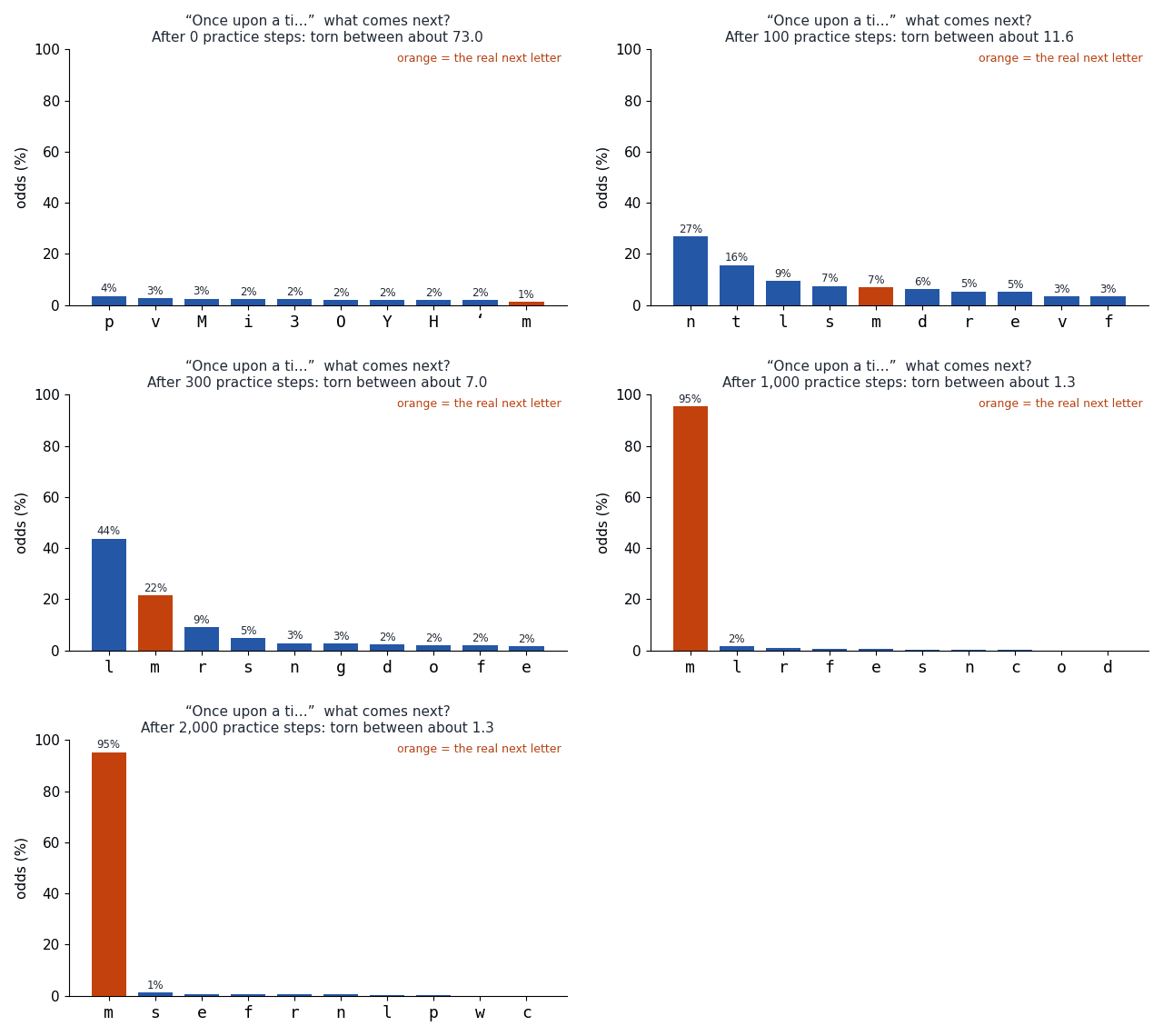
- Brand new (0 steps): the odds are spread almost evenly. It gave m only about 1%. It was torn between about 73 letters.
- After 100 steps: it had learned which letters are common, but not this word. Its top guess was n, and m got only 7%.
- After 300 steps: m rose to 22%, but l was still ahead with 44%.
- After 1,000 steps and after 2000 steps: it gave m 95%. It was torn between only about 1.3 letters.
Here is the same idea for a second beginning, "The king and the qu", where the real next letter is e (to make "queen"):
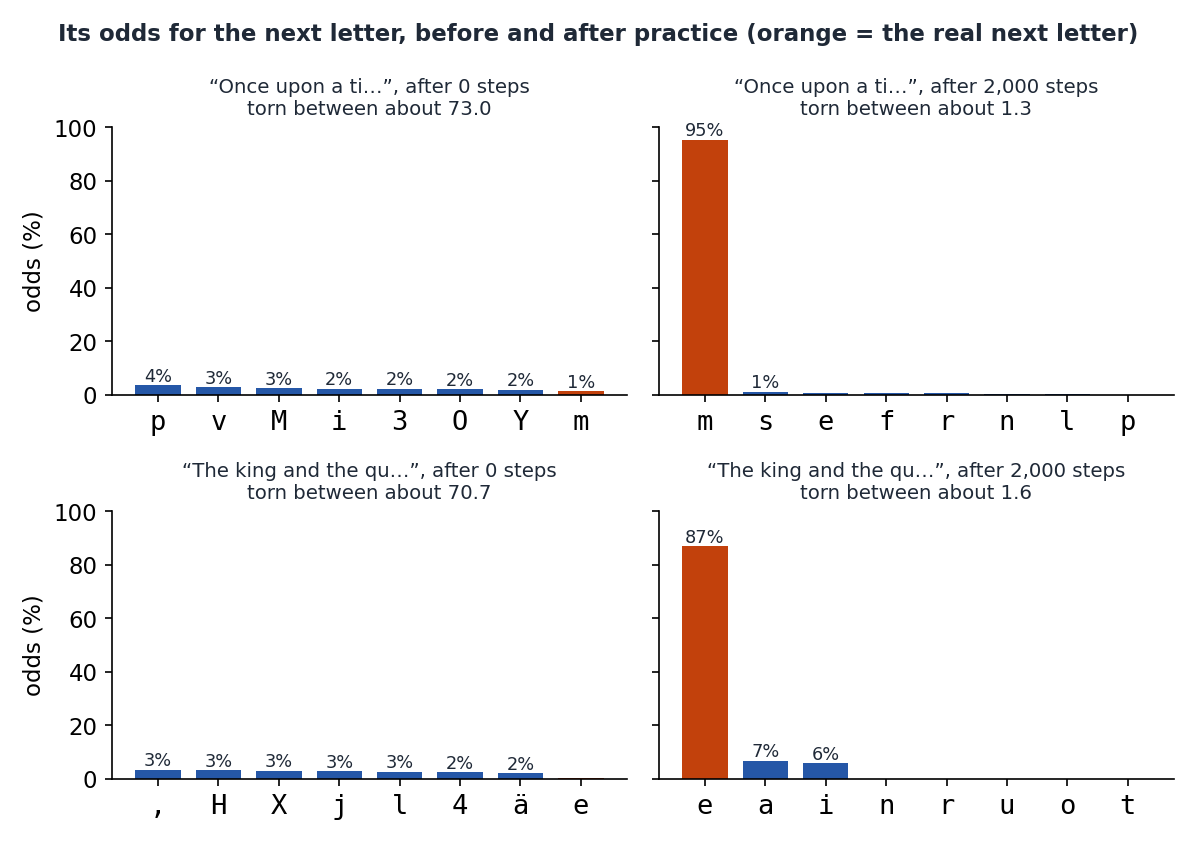
For "The king and the qu", its odds for e grew from under 1% to 87%. It had learned that in fairy tales a "qu" after "the king and the" is very often a queen.
#2. Reading along with a hidden sentence
Now a whole sentence. This one comes from the hidden part of the book, so the model never practised on it.
Can you beat the storyteller? Before we show you the sentence, try guessing it yourself. You choose from just a few letters. The storyteller had to choose from all 81, so you have an easier job!
Here is the whole sentence:
Once upon a time the king held a great feast,
We let the trained model guess each letter, one at a time, looking at all the letters before it. Green means its first guess was right. Red means it was wrong.
Guess first how well it does. Then slide to compare the checkpoints, and tap any letter to see the guesses behind it.
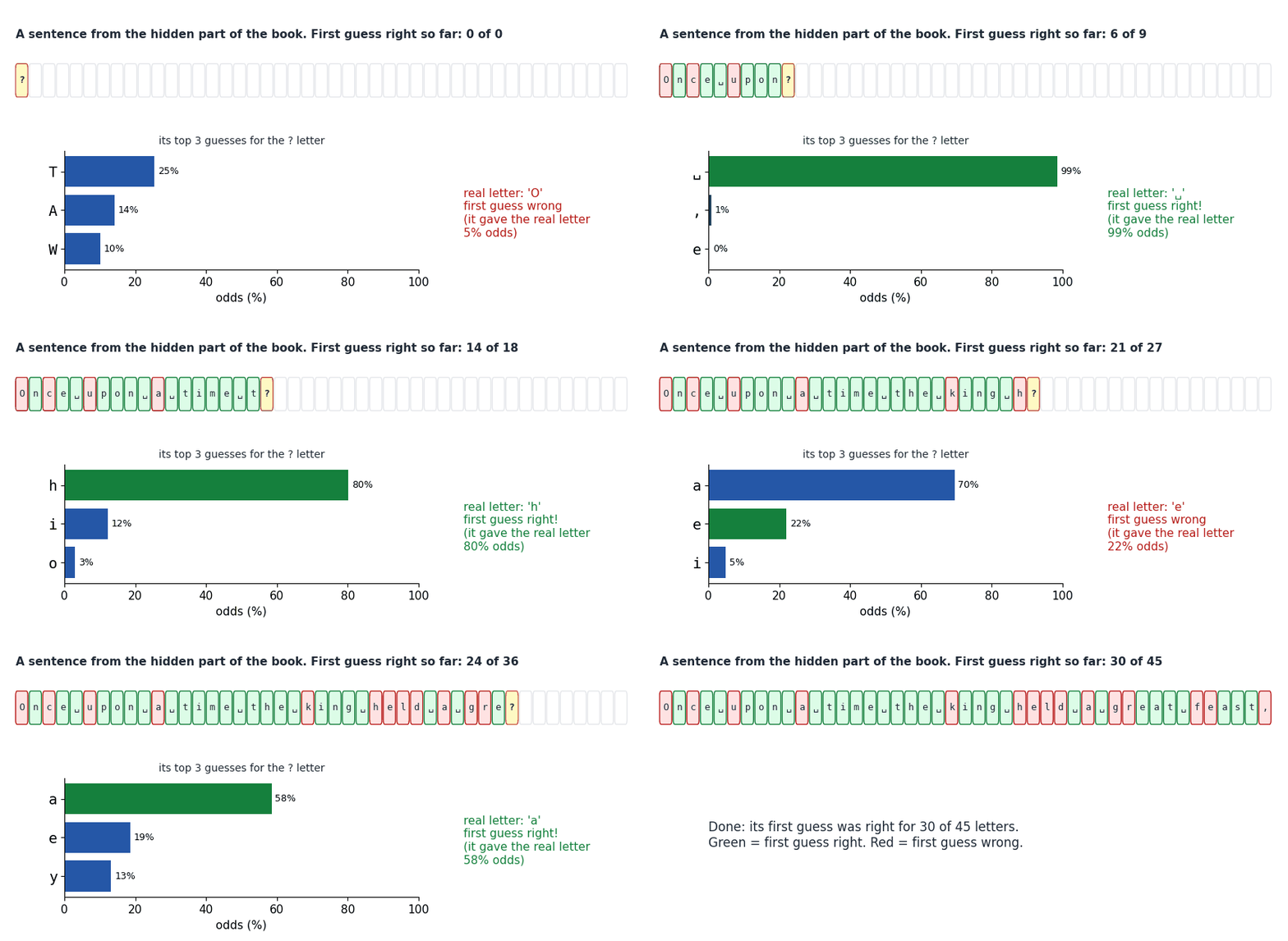
Here is the same sentence at every checkpoint:
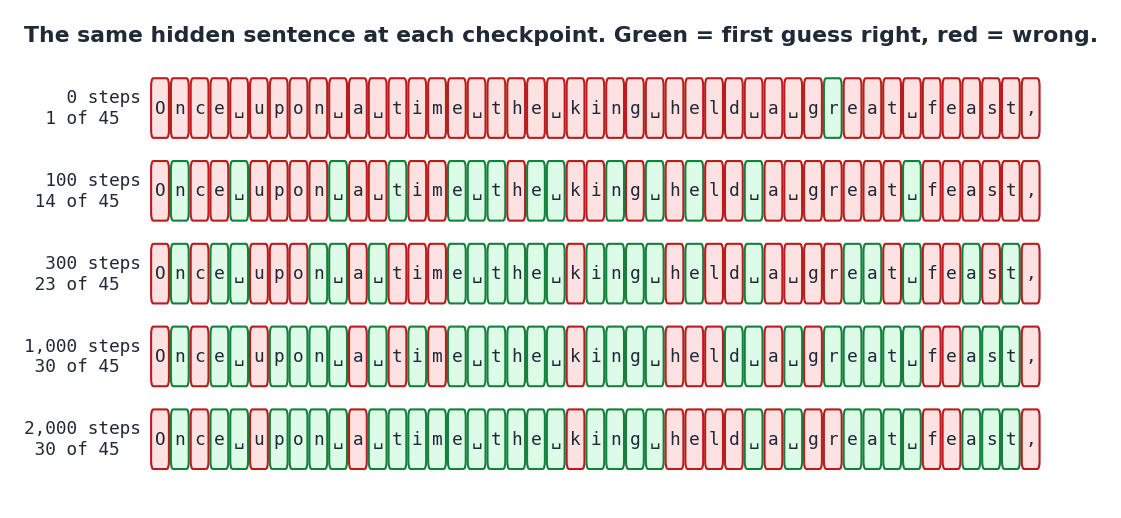
Count the green tiles:
| Practice steps | First guess right (out of 45 letters) |
|---|---|
| 0 | 1 |
| 100 | 14 |
| 300 | 23 |
| 1,000 | 30 |
| 2000 | 30 |
Look at where it goes wrong. It can't know that the sentence starts with "O" rather than "T". It can't know the next word will be "king" or "feast". But once a word has started, like "fe", it often guesses the rest. This is just like you: guessing the next word in a story is hard, but finishing a word is easy.
#3. The scores for the whole hidden part
One sentence could be lucky or unlucky. So we also scored the model on lots of random stretches of the hidden part.
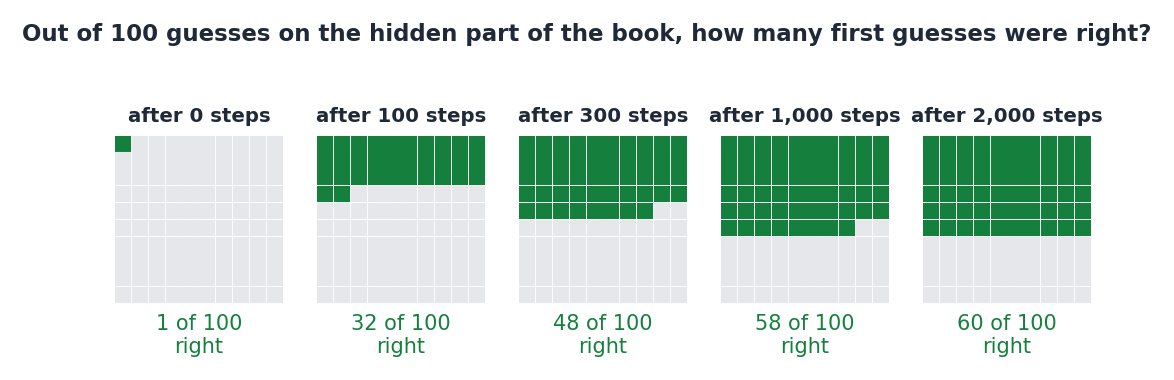
Its first guess was right only about 1 time in 100 when brand new, about as good as guessing at random. After 2000 steps, it was right about 60 times in 100 (59.8%, to be exact).
Here are the "torn between" scores. Remember: smaller is better, and a perfect model would score 1.
| Practice steps | Torn between: hidden part | Torn between: practice part | Perfect score |
|---|---|---|---|
| 0 | 93.2 | 93.3 | 1 |
| 100 | 10.1 | 9.9 | 1 |
| 300 | 5.7 | 5.5 | 1 |
| 1,000 | 4.0 | 3.4 | 1 |
| 2000 | 3.8 | 2.9 | 1 |
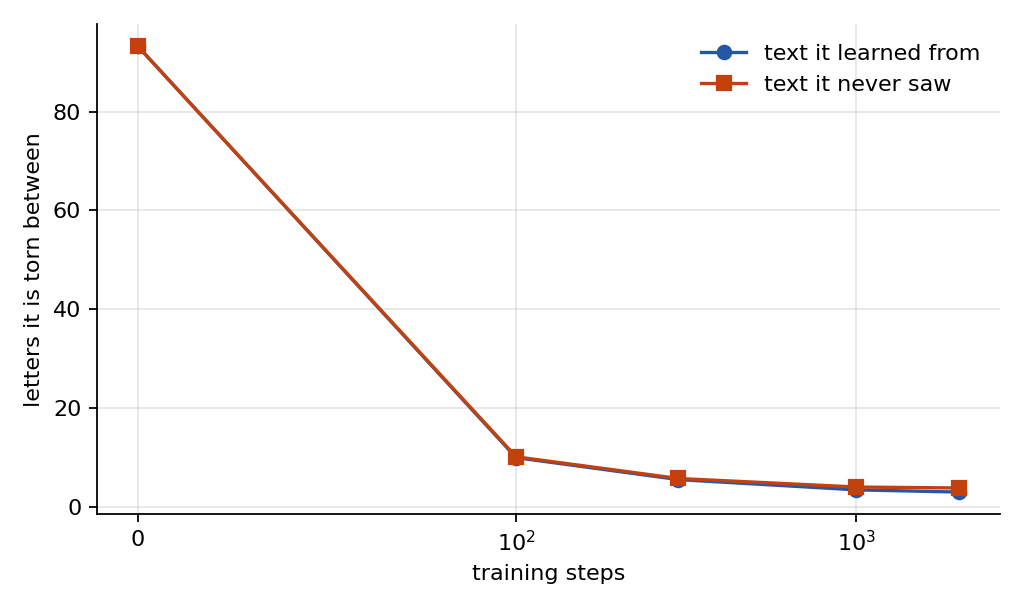
Three things to notice:
- Most of the learning happens early. The biggest drop is in the first 100 steps. After that, it improves more slowly.
- It starts out worse than "knows nothing". A brand-new model is torn between about 93 letters, even though there are only 81. That is because its random knobs make it confidently wrong about some letters, which is worse than evenly unsure.
- The hidden part is a little harder than the practice part. By the end, it is torn between about 2.9 letters on pages it practised on, but about 3.8 on hidden pages. That small gap means it has started to memorise its practice pages a little.
#4. Watching it write
To write a story, we give the model a beginning, "Once upon a time". It gives odds for the next letter. The computer picks a letter using those odds, a bit like spinning a spinner with bigger slices for likelier letters. We stick that letter on the end and ask again. Over and over.
Now you control the typing. Press Next letter to see each roll of the dice.
Here it is as an animation:
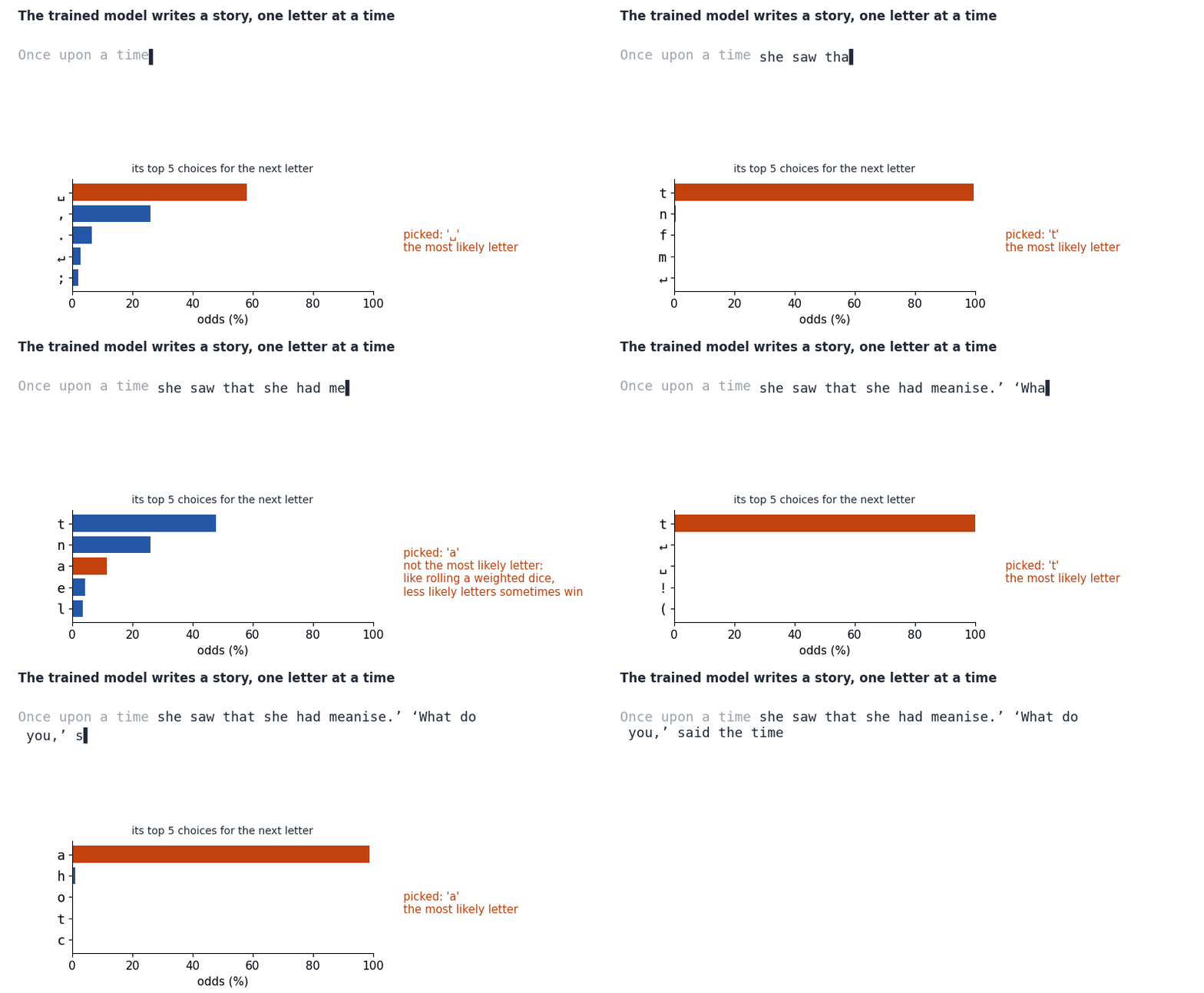
Watch the orange bar. Usually the picked letter is the most likely one. But not always: in this story, 16 of the 60 letters were not its top choice. That is on purpose. If it always picked the top letter, it would write the same thing every time, and often get stuck repeating itself.
#5. How its writing grew
Be the detective. Read this story and guess how much practice it had.
Here is the story it wrote at each checkpoint, always starting from "Once upon a time":
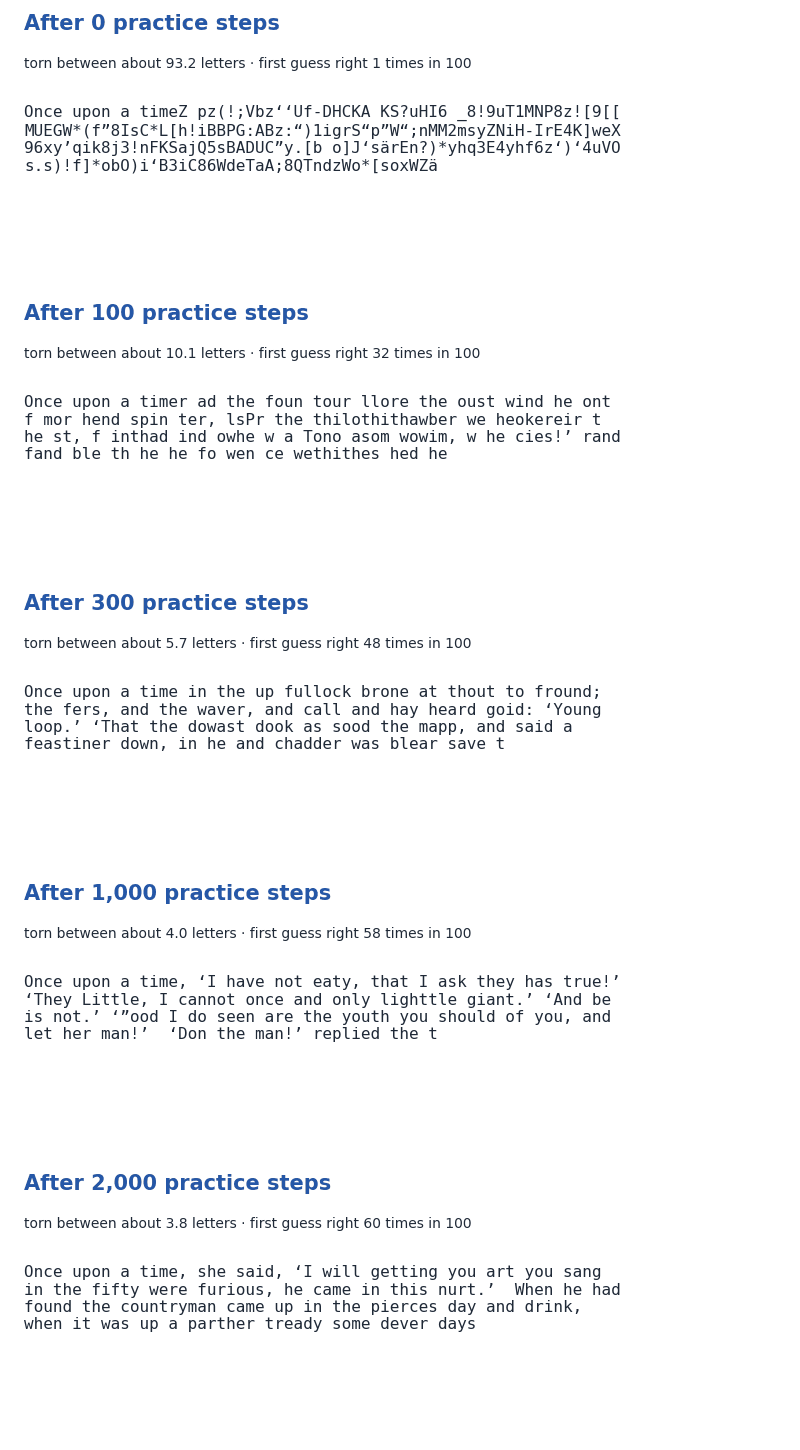
The same stories, side by side:
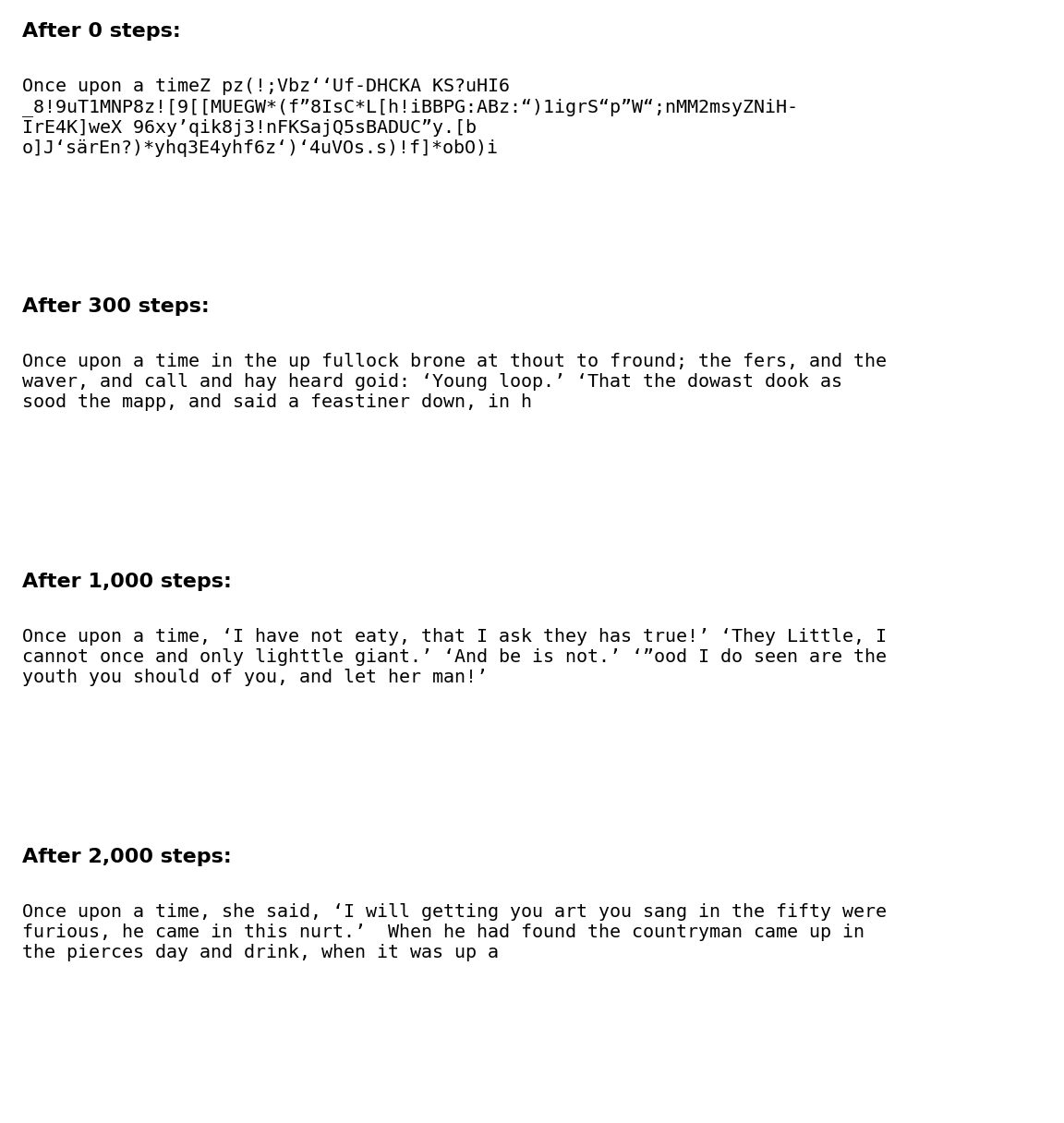
And here is one more, from early on, after just 100 practice steps. The spelling mistakes are exactly what it wrote:
Once upon a timer ad the foun tour llore the oust wind he ont f mor hend spin ter, lsPr the thilothithawber we heokereir t he st, f inthad ind owhe w a Tono asom wowim, w he cies!’ rand fand ble th he he fo wen ce wethithes hed hengan.
What changed along the way:
- After 0 steps: random letters, numbers and symbols.
- After 100 steps: spaces, and little words like "the", "he" and "and". Most other "words" are made up.
- After 300 steps: mostly real words, with commas and quotation marks.
- After 1,000 and 2000 steps: people talking in quotation marks, like ‘I will’, in the old-fashioned style of the book. But the sentences still don't make sense.
#6. What does it look back at?
Remember attention: in each layer, the model decides which earlier letters matter most for its guess. We can peek at that.
We gave the trained model this beginning and asked for the next letter:
Once upon a time there was a king who had a daugh_
Try it. Before you look at the picture, tap the letter you think it looks back at most. Then compare the layers.
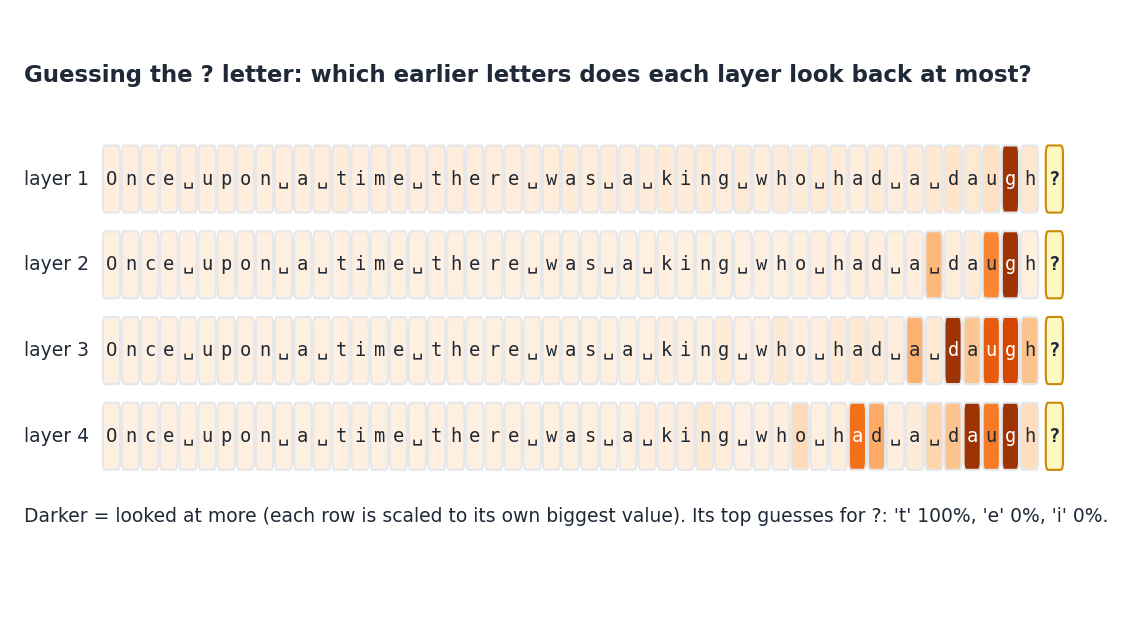
Its guess: t, with almost 100% odds, to make "daughter".
Notice that it hardly looks at the beginning of the sentence. To finish "daugh", the last few letters are what matter, and all four layers look mostly at them. (Peeking inside a model like this gives clues, not a full explanation of how it thinks.)
#7. The adventure dial
When the model writes, there is one more setting we can choose. We call it the adventure dial. Scientists call it temperature.
Turn the dial yourself. Moving the dial changes the odds for one real guess. Then roll the dice to see what it might pick.
- Turned down (careful): it almost always picks its most likely letter.
- In the middle (normal): it usually picks likely letters, but sometimes surprises.
- Turned up (wild): unlikely letters get picked much more often.
All our other stories used the normal setting (0.8). Here is the same trained model, with the dial at three settings:
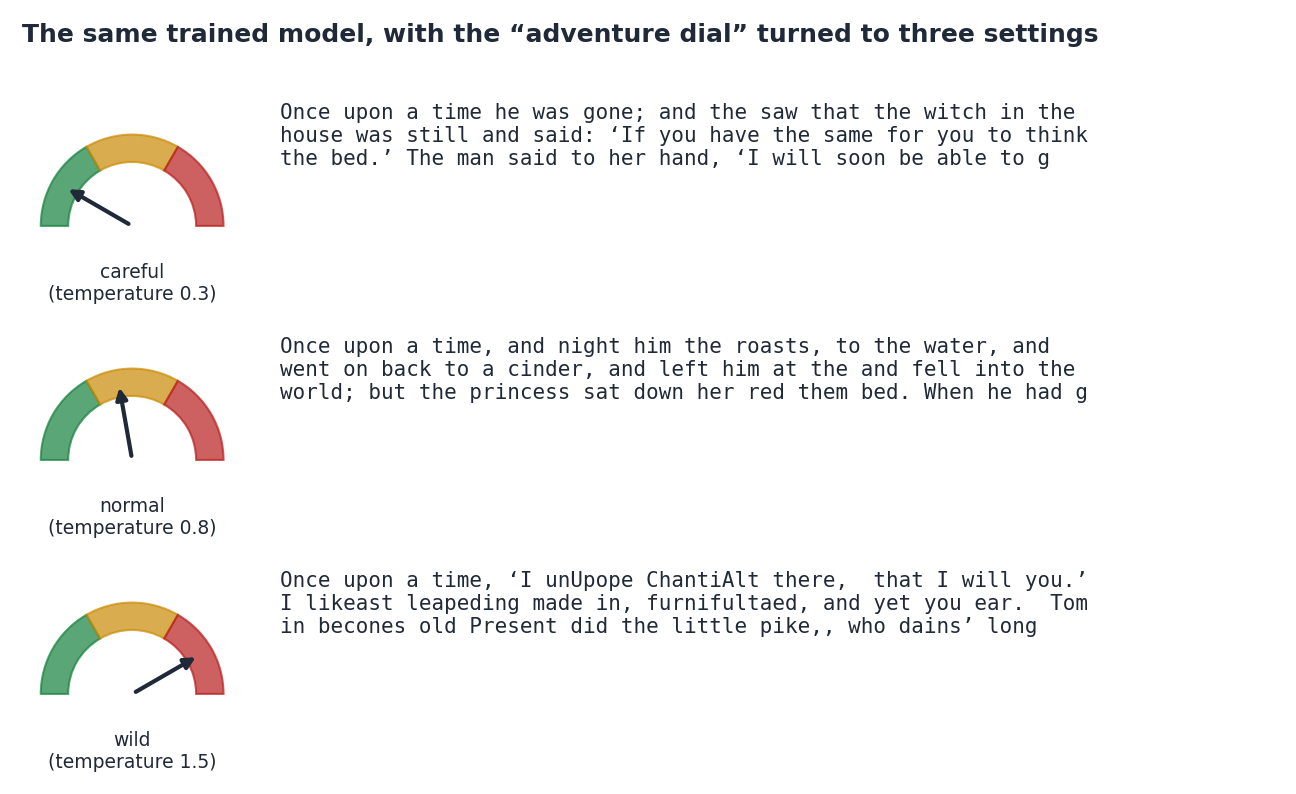
On careful, it uses real words: "he was gone; and the saw that the witch in the house was still". On wild, it invents words like "furnifultaed" and "ChantiAlt". Neither setting makes a sensible story. The dial changes how adventurous it is, not how much it understands.
#What this does and doesn't show
It learned patterns, not just pages. It guessed well on the hidden part of the book, which it never practised on. So it learned general patterns of the book.
It does not understand stories. Its stories sound like fairy tales, but characters appear and disappear and nothing really happens. Good guessing is not the same as understanding.
It is tiny. It has 1835601 knobs and read one book. Real chatbots have hundreds of billions of knobs, read huge amounts of text, and get extra training to be helpful and safe. Our experiment shows how they learn, not how good they are.
Letters, not words. Real chatbots guess chunks of text called tokens, which are often whole words or parts of words. We used single letters because they are easier to see.
One run. We trained it once, starting from one set of random knobs. Another run would write different stories. We did not check how different its scores would be.
Old-fashioned English. The book is an old translation, so the storyteller writes in that old-fashioned style.
#Try it yourself
You can play Shannon's game with a friend. Pick a sentence from a book. Show your friend one letter at a time, and before each letter, ask them to guess it. Count how many first guesses they get right. You will probably find what our storyteller found: the first letter of a word is hard, and the rest of the word is easy!
Code & data
Everything needed to check the numbers above. Click a file to read it here, with line numbers.
#Author verification
✓ Signed by @seawan on
I read the whole post, looked at every picture, and tried all eight interactive figures to make sure a child can follow them. I checked that the story samples and the numbers in the table match the results files from the Delta run.
Written by the author, not generated. The build only checks that it is present.
References
- C. E. Shannon. Prediction and Entropy of Printed English. Bell System Technical Journal, 1951. doi:10.1002/j.1538-7305.1951.tb01366.x ✓ verified (Crossref)
- Ashish Vaswani. Attention Is All You Need. 2017. arXiv:1706.03762 ✓ verified (arXiv)
Every reference above was checked by an automated script against arXiv, Crossref or Semantic Scholar (title, authors, year), and the cited claim was compared against the paper's abstract.
#Reproduce
✓ Delta-reproducible
npx -y github:seawan/vibe-research#f9ee2ba4d36f35ac2051a25f25f435d6c3d36958 seawan/tiny-storytellerPinned to the commit that last changed this post. Rerun spec: delta.yaml. Resources: 2 CPU · 8Gi memory · GPU: 1 × GPU (8000 MiB each) · up to 60 min · domestic.
Need Delta? Register for delta-cli first.
This is a “vibe research” report: the experiments and the write-up were produced with help from an AI assistant and checked by the author. Numbers come from the linked code and data; references were machine-verified.